
How to Ask Better Questions in ChatGPT
If you’ve ever asked ChatGPT a question and received an answer that felt too short, too generic, or completely missed the point, you’re not alone.
Many people assume ChatGPT gives poor answers because the AI isn’t smart enough. In reality, the quality of the response usually depends on the quality of the question.
Think of ChatGPT as a highly knowledgeable assistant. If you ask, “Tell me about marketing,” you’ll get a broad overview. But if you ask, “Explain three low-cost digital marketing strategies for a small online clothing business with a $500 monthly budget,” the response becomes much more useful.
Learning how to ask better questions is one of the most valuable skills you can develop when using ChatGPT. Whether you’re a student, business owner, marketer, programmer, or someone simply looking for information, better prompts lead to better results.
In this guide, you’ll learn practical techniques for writing effective prompts, common mistakes to avoid, and real examples that you can start using today.
What You’ll Learn
By the end of this guide, you’ll know how to:
- Ask clear and specific questions
- Give ChatGPT the right amount of context
- Request responses in different formats
- Avoid common prompt-writing mistakes
- Improve the quality of AI-generated answers
- Create prompts that save time and produce better results
What Is a Prompt?
A prompt is simply the instruction or question you give to ChatGPT.
For example:
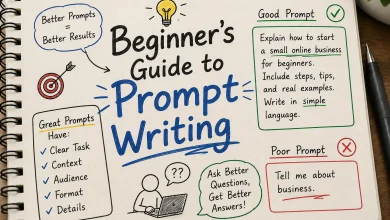
Weak Prompt
Tell me about fitness.
Better Prompt
Explain a beginner-friendly fitness plan for someone who wants to lose weight at home without gym equipment.
The second prompt provides more information, allowing ChatGPT to generate a more targeted response.
Why Better Questions Matter
ChatGPT doesn’t read your mind. It only works with the information you provide.
Imagine asking a travel agent:
I want to travel.
They’ll probably ask:
- Where?
- When?
- What’s your budget?
- How long will you stay?
The more details you provide, the better the recommendation.
The same principle applies when using ChatGPT.
The Five Elements of a Great Prompt
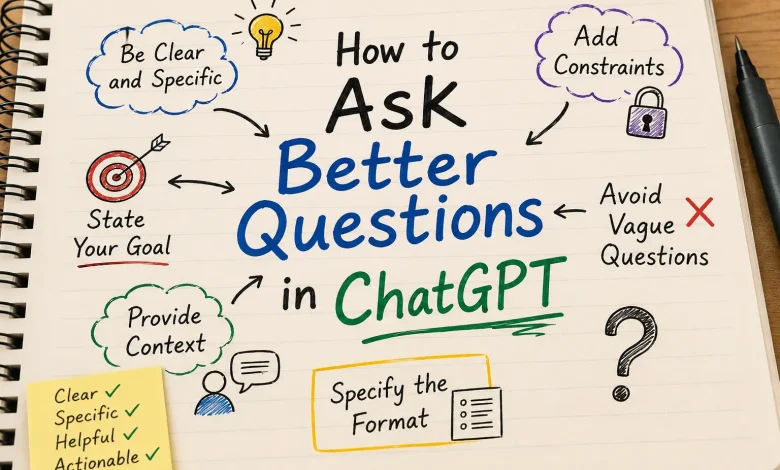
1. Be Specific
Specific prompts produce specific answers.
Instead of:
Write an email.
Try:
Write a professional email requesting a one-week extension for a university assignment because I was ill.
Specificity removes guesswork.
2. Provide Context
Context tells ChatGPT about your situation.
Instead of:
Create a marketing plan.
Use:
Create a three-month marketing plan for a new online bakery that sells custom birthday cakes in New York with a monthly advertising budget of $1,000.
Context helps the AI tailor its suggestions to your needs.
3. State Your Goal
Always explain what you’re trying to achieve.
Example:
I want to improve my LinkedIn profile to attract software engineering recruiters.
Now ChatGPT understands the purpose behind the request.
4. Specify the Format
Tell ChatGPT how you’d like the answer presented.
Examples include:
- Bullet points
- Numbered lists
- Tables
- Step-by-step guides
- Checklists
- Email drafts
- Blog posts
- Social media captions
- Summaries
For example:
Explain the process in five simple steps.
This often makes the response easier to read and follow.
5. Mention Any Constraints
Constraints help narrow the response.
Examples:
- Under 500 words
- Suitable for beginners
- Use simple English
- Include real examples
- Avoid technical jargon
- Write in a professional tone
These instructions help shape the final output.
The CLEAR Prompt Formula
A simple way to write better prompts is to use the CLEAR framework.
C – Context
Describe your situation.
Example:
I’m a university student preparing for final exams.
L – Limitations
Explain any restrictions.
Example:
I only have two hours each day to study.
E – Expectation
Describe the outcome you want.
Example:
Create a two-week revision schedule.
A – Audience
Tell ChatGPT who the content is for.
Example:
Explain it as if you’re teaching a complete beginner.
R – Response Format
Choose the format.
Example:
Present the answer as a table.
Examples of Better Prompts
Example 1
Poor Prompt
Help me with SEO.
Better Prompt
Explain beginner-friendly SEO techniques for a new blog that has fewer than 20 articles.
Example 2
Poor Prompt
Write a blog.
Better Prompt
Write a 2,000-word beginner’s guide on email marketing for small businesses. Use headings, practical examples, and an FAQ section.
Example 3
Poor Prompt
Help me study.
Better Prompt
Create a seven-day study plan for a university biology exam covering genetics, ecology, and human anatomy.
Example 4
Poor Prompt
Make a business plan.
Better Prompt
Create a business plan for a mobile car wash startup with an initial budget of $5,000. Include startup costs, pricing, marketing strategy, and a six-month financial projection.
Common Mistakes to Avoid
Being Too Vague
Avoid prompts like:
- Explain AI.
- Tell me about history.
- Help me write.
These leave too much open to interpretation.
Asking Multiple Questions at Once
Instead of asking:
Explain SEO, write a blog, generate keywords, create social media posts, and build a content calendar.
Break the task into smaller prompts.
This often results in clearer and more accurate responses.
Forgetting Important Details
If you’re asking ChatGPT to write content, include information such as:
- Target audience
- Tone
- Word count
- Purpose
- Industry
- Examples
The more relevant details you provide, the better the output.
Expecting Perfect Answers Immediately
You don’t have to settle for the first response.
Follow up with questions like:
- Can you explain this more simply?
- Add practical examples.
- Rewrite this for beginners.
- Expand section three.
- Turn this into a checklist.
Treat the conversation as an ongoing collaboration.
Prompt Templates You Can Use
Learning
Explain [topic] as if I’m a beginner. Use simple language, practical examples, and a summary at the end.
Writing
Write a [type of content] about [topic] for [audience]. Use a friendly tone and include headings and examples.
Business
Act as a business consultant and help me create a strategy for [business]. Include risks, opportunities, and actionable recommendations.
Coding
Explain this code step by step. Highlight any errors and suggest improvements.
Marketing
Create a content strategy for a [business type]. Include social media ideas, blog topics, and email campaign suggestions.
Advanced Tip: Assign a Role
One useful technique is to tell ChatGPT which perspective to take.
Examples:
- Act as an experienced teacher.
- Act as a career coach.
- Act as a software engineer.
- Act as a financial analyst.
- Act as a travel planner.
Providing a role can make the response more focused and relevant to your needs.
Frequently Asked Questions
Does using longer prompts always produce better answers?
Not necessarily. The goal is to provide enough detail without adding unnecessary information. Clear, relevant prompts usually perform best.
Can I ask follow-up questions?
Yes. ChatGPT is designed for conversations, so you can refine, clarify, or expand on previous responses.
Should I tell ChatGPT who the audience is?
Absolutely. Mentioning whether the content is for beginners, professionals, students, or customers helps tailor the response.
Can ChatGPT remember previous messages?
Within the same conversation, ChatGPT can use earlier messages as context. Depending on your settings, memory features may also help personalize future interactions, but it’s still a good idea to include important details when they matter.
What if the answer isn’t what I wanted?
Refine your prompt. Add more context, specify the format, or explain your goal more clearly. Small changes often lead to much better results.
Final Thoughts
Learning how to ask better questions is one of the easiest ways to improve your experience with ChatGPT. Instead of relying on generic prompts, focus on being clear, specific, and intentional. Include context, describe your goal, choose the format you want, and don’t hesitate to refine your prompts through follow-up questions.
Like any skill, writing effective prompts gets better with practice. The more you experiment and adjust your instructions, the more useful and accurate ChatGPT’s responses will become. Start applying these techniques today, and you’ll quickly notice the difference in the quality of the answers you receive.
Secondary Keywords:
- ChatGPT prompt tips
- How to write better prompts
- ChatGPT prompt guide
- Beginner ChatGPT prompts
- Improve ChatGPT responses